Object Node
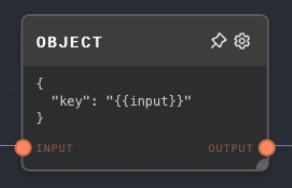
Overview
The Object Node allows you to create an object or array from input values and a JSON template. The node automatically escapes the input values and inserts them into the template.
This node is particularly useful for creating structured values from multiple inputs. It supports any data type as input and outputs an object or array.
- Inputs
- Outputs
- Editor Settings
Inputs
| Title | Data Type | Description | Default Value | Notes |
|---|---|---|---|---|
| (Dynamic) | any | The input values to be inserted into the JSON template. The input names are dynamically generated. | N/A | Whole unquoted placeholders preserve JSON values. Placeholders inside JSON strings are escaped as string content. The input names are extracted from the JSON template. |
Outputs
| Title | Data Type | Description | Notes |
|---|---|---|---|
| Output | object or object[] | The object or array created from the input values and the JSON template. |
Editor Settings
| Setting | Description | Default Value | Use Input Toggle | Input Data Type |
|---|---|---|---|---|
| JSON Template | The JSON template to be used for creating the object. Input values are inserted into this template. | { "key": "{{input}}" } | No | string |
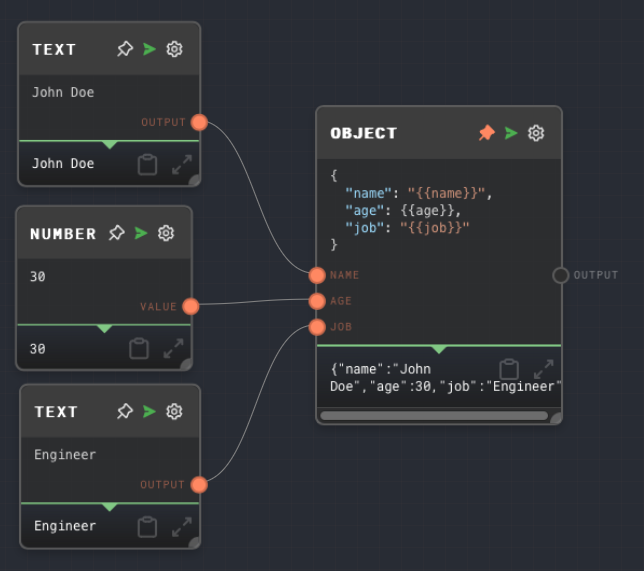
Example 1: Creating an object from multiple inputs
Create an Object Node and set the JSON Template to the following:
{
  "name": "{{name}}",
  "age": {{age}},
  "job": "{{job}}"
}
Create two Text Nodes and set their values to
John DoeandEngineerrespectively. Connect them to thenameandjobinputs of the Object Node.Create a Number Node and set its value to
30. Connect it to theageinput of the Object Node.Run the graph. The
Outputof the Object Node should be the following object:{
"name": "John Doe",
"age": 30,
"job": "Engineer"
}
Interpolation in JSON strings
Use a placeholder as a whole JSON value when you want to preserve the input's data type:
{
  "rawValue": {{value}},
  "stringValue": "{{value}}"
}
You can also embed placeholders inside larger JSON strings:
{
  "message": "{{name}}. That's it."
}
When a placeholder is embedded in a JSON string, strings are inserted as text, non-string values are inserted as their JSON text, and null or undefined values are inserted as the text null. Quotes, backslashes, and newlines are escaped automatically so the final template stays valid JSON.
Error Handling
The Object Node will error if the JSON Template is not a valid JSON string or if the interpolated JSON string (after inserting the input values) is not a valid JSON string.
FAQ
Q: Can I use the Object Node to create an array?
A: Yes, you can use the Object Node to create an array by setting the JSON Template to a valid JSON array string. For example:
["{{value1}}", "{{value2}}", "{{value3}}"]
Q: How are the input values escaped?
A: The input values are automatically escaped by the Object Node. Whole unquoted placeholders insert JSON values directly. Whole quoted placeholders create JSON strings, converting non-string values to JSON text first. Placeholders embedded inside larger JSON strings are escaped as string fragments.