Coalesce Node
Overview
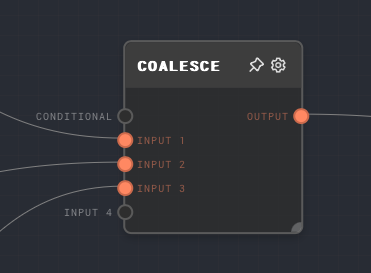
The Coalesce Node returns the first usable value from a list of inputs. By default, "usable" means the first input that is not Not Ran.
Values that show as Not Ran in the UI have been excluded from the run due to control flow processing. Coalesce consumes those values, skips over them, and continues checking later inputs. This makes it useful for taking a set of branches where only one branch runs and returning that branch's output. See the examples section for more information on using this with a Match Node.
null and undefined are treated as real output values by default. Enable Ignore 'null' or Ignore 'undefined' when those values should also be skipped so Coalesce continues checking later inputs.
- Inputs
- Outputs
- Editor Settings
Inputs
| Title | Data Type | Description | Default Value | Notes |
|---|---|---|---|---|
| Conditional | boolean | If connected, this can be used so that the Coalesce node itself is only run conditionally. | N/A | This port gates the Coalesce node and is not considered as a candidate output value. If this port is Not Ran, the Coalesce node outputs Not Ran. |
| Input X | Any | One of the inputs to check. The first input that is not Not Ran and is not skipped by the active ignore settings will be passed to the output. | N/A | Dynamic number of inputs based on how many are connected. |
Outputs
| Title | Data Type | Description | Notes |
|---|---|---|---|
| Output | Any | The value of the first usable input. | If every input is Not Ran or skipped by settings, then the output is Not Ran. |
Editor Settings
| Setting | Description | Default Value | Use Input Toggle | Input Data Type |
|---|---|---|---|---|
| Ignore 'null' | Treat null inputs as skipped values and continue checking later inputs. | Off | No | N/A |
| Ignore 'undefined' | Treat explicit undefined inputs as skipped values and continue checking later inputs. | Off | No | N/A |
When either setting is enabled, the node body shows the active setting as a separate line so the workflow canvas makes the Coalesce mode visible without opening settings.
Example 1: Default Values / Not Ran Checks
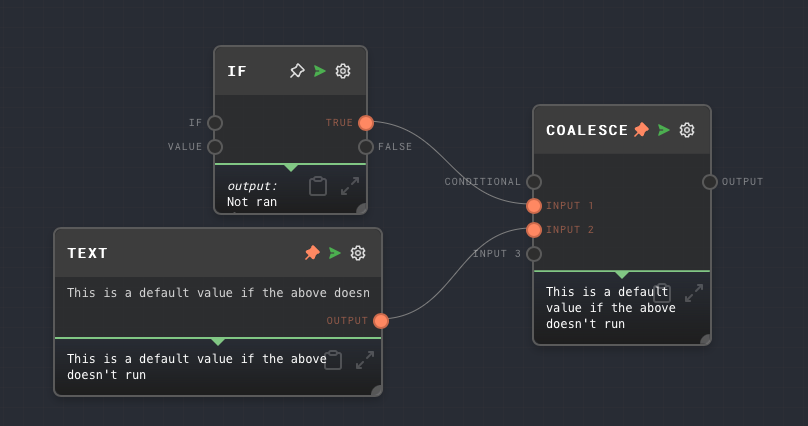
You can use a Coalesce Node to provide a default value for a branch that may not run.
- Create an If node but do not connect to the input, so that it will not run.
- Connect the output of the If node to the Coalesce node.
- Connect a Text node with a hardcoded value to the 2nd input of the Coalesce node.
- Run the graph. Note that the output of the Coalesce node will be the value of the Text node, since the If node did not run.
If the If node runs and outputs an explicit null or undefined, Coalesce will output that value by default. Turn on Ignore 'null' or Ignore 'undefined' when those values should fall through to the default instead.
Example 2: Getting a single value from a Match node
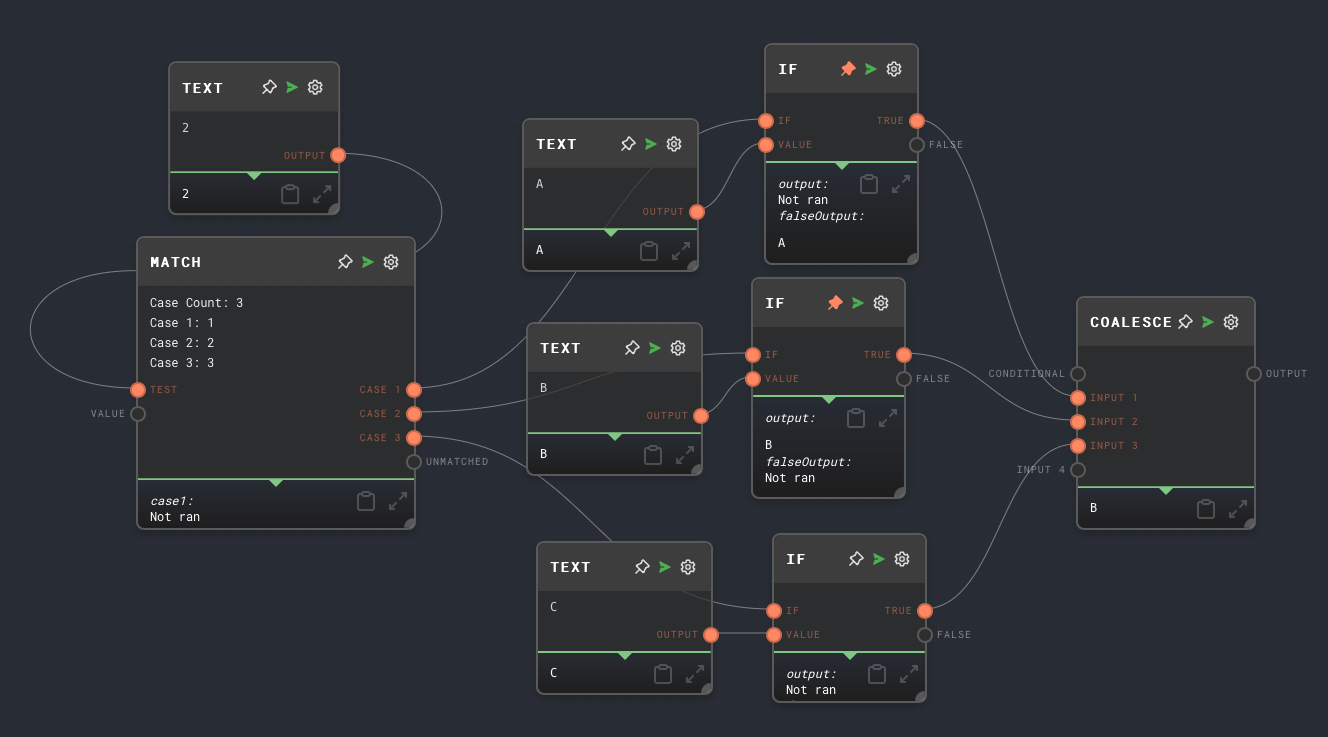
- Create a Match Node with a few different cases, say
1,2, and3. - For each of the cases, use an If Node to transform each of the cases into a unique value, say
A,B, andC. You can use a Text Node connected to thevalueport of the If Nodes to set the value passed through for each of the cases. - Connect the outputs of each of the If nodes to one of the inputs on a Coalesce node.
- Connect an input to the Match node so that only one of the cases will run.
- Run the graph. Note that the output of the Coalesce node will be the value of the If node that ran.
The above is a common pattern for working with a Match node - you can get a unique value for each case using an If node, which is not dependent on the value passed into the Match node itself.
Error Handling
The coalesce node cannot error in normal operation.
FAQ
Q: Will an empty string be passed over?
A: No, an empty string is a real value for the Coalesce Node. If you would like to skip over empty strings, use an If Node to check for empty strings and return Not Ran, null, or undefined, then configure Coalesce to skip the value you chose.
Q: Are null and undefined passed over?
A: Not by default. Coalesce outputs null and undefined as real values unless you enable Ignore 'null' or Ignore 'undefined'.