Code Node
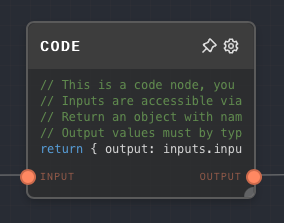
Overview
The Code Node allows you to run arbitrary JavaScript code during your graph's execution. This can be useful for a variety of purposes, such as:
- Performing complex calculations
- Custom, domain-specific logic that is complex to represent in Rivet nodes alone
- Using JavaScript functions that are not available in other nodes
Code Inputs
The inputs to the code node are accessible in the special variable inputs. To access the input named foo, it is accessible on inputs.foo.
All inputs have the following structure:
{
  type: string;
  value: any;
}
The type of each input corresponds to a Data Type. The value is the actual value of the input.
For example, if you have an input named myNumber that is a number, you can access it in the code node like this:
const foo = inputs.myNumber.value; // inputs.myNumber.type === 'number'
Code Outputs
The code node must return an object containing the output values. Each property of the output object must correspond to one of the configured output names in the editor.
Each of the values of the properties must be an object with the {type: DataType; value: any} structure described above.
For example, if you have an output named myNumber that is a number, you can return it like this:
return {
  myNumber: {
    type: 'number',
    value: 123,
  },
};
To return JavaScript undefined as the output value itself, wrap it as an any value:
return {
  output: {
    type: 'any',
    value: undefined,
  },
};
Rivet displays that output as undefined. This is different from returning control-flow-excluded, which means the output did not run.
Accessing Current Graph And Context Inputs
You can access all the current graph and the context inputs through variables graphInputs and context.
For example, if you have a graph input named myString that is a string, you can access it in the code node like this:
const foo = graphInputs.myString.value; // graphInputs.myString.type === 'string'
- Inputs
- Outputs
- Editor Settings
Inputs
| Title | Data Type | Description | Default Value | Notes |
|---|---|---|---|---|
| (custom names) | Any | The input values passed into the code function. Dynamic based on the inputs configured in the editor. | undefined | Always accepts any data type. |
Outputs
| Title | Data Type | Description | Notes |
|---|---|---|---|
| (custom names) | Any | The outputs from the execution of the code node. Dynamic based on the | NOTES |
Editor Settings
| Setting | Description | Default Value | Use Input Toggle | Input Data Type |
|---|---|---|---|---|
| Inputs | The names of the inputs accessible through the inputs object. Each input creates a corresponding input port. | input1 | No | N/A |
| Outputs | The names of the outputs that the returned object must contain. Each output creates a corresponding output port. | output1 | No | N/A |
| Runtime Permissions | Per-node toggles for optional globals: fetch, Rivet, console, require, and process. | All off | No | N/A |
Example 1: Use .slice to get a substring
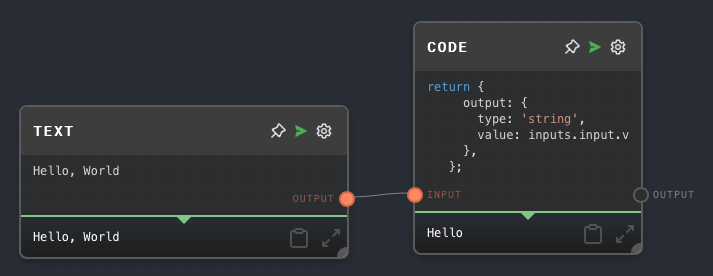
Create a Code Node with the following code:
return {
  output: {
    type: 'string',
    value: inputs.input.value.slice(0, 5),
  },
};
Create a Text node, give it the value
Hello World, and connect it to the Code Node'sinputport.Run the graph. Note that the Code Node's output is
Hello.
Example 2: Concatenate two strings, and output the length and the string.
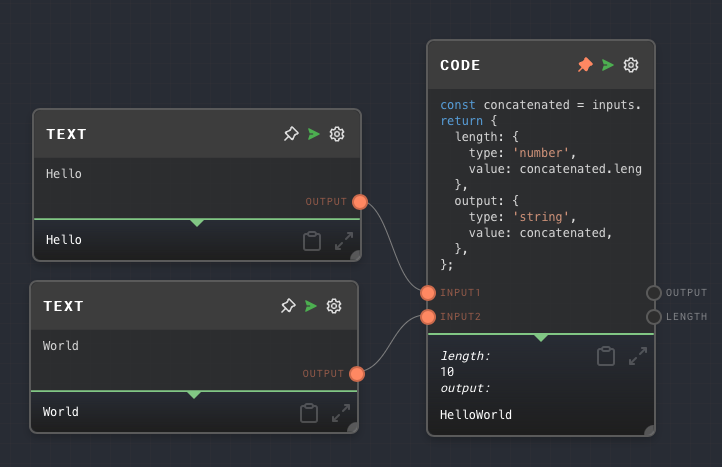
Create a Code Node with the following code:
const concatenated = inputs.input1.value + inputs.input2.value;
return {
  length: {
    type: 'number',
    value: concatenated.length,
  },
  output: {
    type: 'string',
    value: concatenated,
  },
};
Rename the existing input of the Code node to
input1, and add a 2nd input toinput2. Add a 2nd output namedlength.Create two Text nodes, give them the values
HelloandWorld, and connect them to the Code Node'sinput1andinput2ports, respectively.Run the graph. Note that the Code Node outputs
HelloWorldand10.
Error Handling
If any error happens during the execution of the Code Node, then the node will error.
If you are unsure of the type of value passed into the code node, for example when reusing it in multiple places, you can and should check the type of the input before using it. For example:
if (inputs.input.type === 'string') {
  // Do something with inputs.input.value
}
If you throw an Error in the code node, then it will error.
FAQ
Q: How is the code node implemented?
A: The Code Node is implemented using an async Function constructor. The always-present argument is inputs; optional runtime permissions add more globals such as fetch, Rivet, console, require, and process.
async function codeNode(inputs) {
  // Code here
}
Q: Can I use require or import in the code node?
A: import is not exposed. require is available only in the Node executor when the Code node's require runtime permission is enabled. Programmatic Node runs use NodeCodeRunner; the desktop Node executor uses the app-executor runner. Both resolve modules from the process working directory by default, and hosted/runtime-library environments can override that with RIVET_CODE_RUNNER_REQUIRE_ROOT or RIVET_CODE_RUNNER_REQUIRE_ANCHOR.
Q: Can I use async/await in the code node?
A: Yes. Code nodes run through an async function, so you can use await directly.
Q: Can I use external libraries in the code node?
A: In Browser executor mode, external libraries are not available. In Node executor mode, enable the require runtime permission and require packages that are resolvable from the Code-runner require root. For larger reusable integrations, a Rivet plugin is still usually cleaner.
Q: Can I use console.log in the code node?
A: Yes, when the Code node's console runtime permission is enabled. In the app executor, console calls are forwarded back to the Rivet UI for the active run.
Q: Can the code node function like an If Node?
A: Yes. If you return the special value { type: 'control-flow-excluded', value: undefined } from the Code node, then the nodes after the Code node will be excluded from the graph's execution. Rivet displays that output as Not ran, not as the literal undefined value. This is useful if you want to conditionally execute a portion of the graph.
Q: Is there any timeout? What if I create an infinite loop?
A: There is no timeout. If you create an infinite loop, then the graph will hang indefinitely.