Context Node
Overview
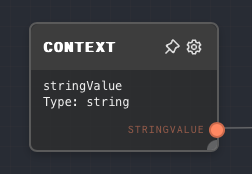
Context values are shared run inputs that are accessible in any graph, whether the graph is the entry-point graph or a subgraph called by another graph. The Context node reads one of those values by ID.
This is useful for values that should be available everywhere without threading them through Graph Input nodes, such as current-date values, tenant IDs, environment-specific configuration, or API keys.
In the desktop app, context values are edited in the Project tab under Context. They are stored by the Rivet app for that project ID, not written into the .rivet-project file.
In code, context values are passed with the contextValues / context run option. @valerypopoff/rivet2-node accepts loose primitive values and converts them into Rivet DataValue objects:
import * as Rivet from '@valerypopoff/rivet2-node';

const context = {
  stringContext: 'str',
  numberContext: 1,
  booleanContext: true,
};

const processor = Rivet.createProcessor({
  ...etc,
  context,
});
The Context node is not the only way to access context values. You can also access them in the Text Node, Prompt Node, Object Node, and some path editors with {{@context.<id>}} interpolation. In the Code Node, use context.<id>.value.
- Inputs
- Outputs
- Editor Settings
The context node has no inputs besides optional ones from the Editor Settings page.
Outputs
| Title | Data Type | Description | Notes |
|---|---|---|---|
| (Context ID) | (Configured in editor) | The value of the context value. | The ID and data type are configured in the Editor Settings page of the Context node. If the context value is not set, then the default value configured in the editor settings, or via the input port, will be used. |
Editor Settings
| Setting | Description | Default Value | Use Input Toggle | Input Data Type |
|---|---|---|---|---|
| ID | The ID of the context that you are pulling in. Must match exactly to the ID passed in to contextValues in the parent application. | (required) | No | N/A |
| Data Type | The data type of the value passed in to contextValues. The value will be coerced to this data type if it does not match. | String | No | N/A |
| Default Value | The fallback value when the context value is not set or cannot be resolved. | Type default | Yes | Same data type as the configured Data Type above. Will be coerced into the data type configured. |
Example 1: Access a string context value
In your parent application, pass a string value into contextValues:
import * as Rivet from '@valerypopoff/rivet2-node';

const context = {
  stringContext: 'str',
};

const processor = Rivet.createProcessor({
  ...etc,
  context,
});
In your graph, add a Context node. Set the ID to stringContext, and the Data Type to String. Leave the Default Value empty.
Run your graph while the Remote Debugger is attached. The output of the Context node should be str.
Error Handling
The Context node normally does not error. It resolves values in this order:
contextValues[ID], coerced to the configured Data Type.- The Default Value input, if the input toggle is enabled and the input is connected.
- The editor Default Value, coerced to the configured Data Type.
- The built-in default for the configured Data Type, such as an empty string,
0,false, or an empty array.
FAQ
Q: Can I use the Context node to pass in the current date and time?
A: Yes, you can pass in the current date as a context value:
const processor = Rivet.createProcessor({
  ...etc,
  context: {
    currentDate: { type: 'date', value: new Date().toISOString().slice(0, 10) },
  },
});
Then, in your graph, add a Context node. Set the ID to currentDate, and the Data Type to Date. Leave the Default Value empty.
Q: Can I use the Context node to pass in a function?
A: No, you cannot pass in a function as a context value. You can only pass in Data Values
Q: Can I use the Context node to pass in a custom data type?
A: No, you cannot pass in a custom data type as a context value. You can only pass in Data Values