Executing Workflows
Data Flow
In general, data flows from left to right in a graph.
Graph execution will start from every node that does not have any inputs. You can refer to these nodes as root nodes.
When a node is executed, it will send its output to all of its connected nodes.
A node must wait for all of its inputs to be received before it can execute.
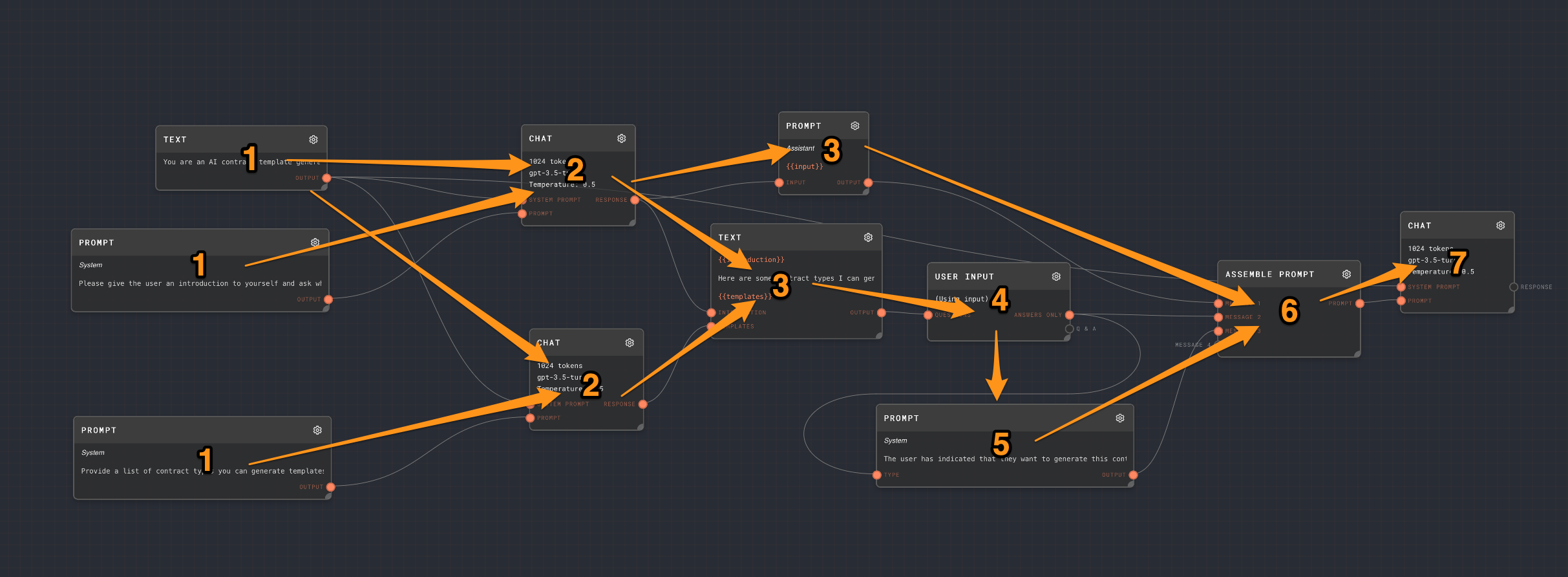
The following graph will roughly execute in the order of these numbers. Every node with the same number will run in parallel. The arrows show the rough "flow" of the data.
Chaining LLM Responses
A common flow for chaining model responses will be something like:
- Initialize a system prompt with a Text Node, and connect it to the System Prompt port of an LLM Chat Node.
- Construct your main prompt by using a Text Node or a Prompt Node, and connect it to the Prompt port of an LLM Chat Node. You may also use an Assemble Prompt Node to construct a series of messages. The Prompt input accepts a string, string array, chat message, or chat-message array.
- Commonly you will want to parse the LLM Chat Response output. For text responses, use the Extract with Regex Node, the Extract JSON Node, or the Extract YAML node. For JSON or JSON schema response formats, LLM Chat outputs the parsed structured value directly when parsing succeeds, so downstream nodes can read it as an object without an extra JSON extraction step. If structured parsing fails, the Response output falls back to the raw string.
- Next, it is common to use an Extract Object Path node to extract a specific value from the structured data using jsonpath. This is useful if you are using the Extract JSON Node or the Extract YAML node.
- You may want to take different actions depending on what your extracted value is. For this, you can use the Match Node to match the extracted value against a series of patterns. Or, you can use an If/Else Node to get fallback values.
- Next, you will often use more Text Nodes, Prompt Nodes, or Code nodes while interpolating extracted values, then send the result to another LLM Chat node.
- The workflow can continue indefinitely, with the response of one LLM Chat node becoming part of the prompt for another LLM Chat node. Or, you can use a Loop Controller Node to pipe the results of this workflow back into itself.
The legacy Chat Node is still available for existing projects, but new Rivet 2 workflows should usually start with LLM Chat because it supports OpenAI, Anthropic, Google, custom OpenAI-compatible providers, input-port API keys, reasoning settings, tool use, and response status/error diagnostics from one node.