Chat Viewer
The Chat Viewer gives you a live view of Chat and LLM Chat nodes that have produced chat content in your Rivet graphs. The top-bar "Chat Viewer" tab appears only when there is something to inspect.
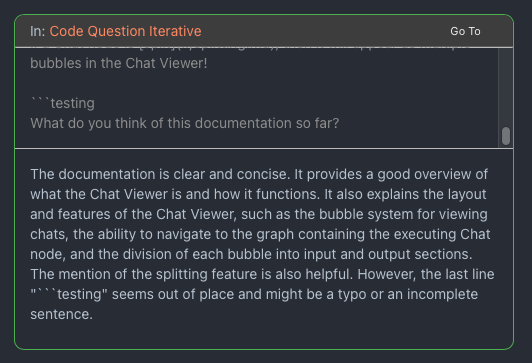
Each Chat or LLM Chat node that executes will show as a bubble in the Chat Viewer, with live text streamed in when the provider supports streaming.
At the top of each bubble, you will see what graph contains the executing chat node, and you can quickly navigate to that graph without interrupting execution.
The top half of each bubble contains the input messages, and the bottom half contains the output.
If a chat node is set to run many items, then it will appear as multiple bubbles in the Chat Viewer.
Filter
At the top, you may enter text to filter what graphs you are seeing Chat bubbles for. This is useful for narrowing down the chats to a specific part of your agent that you are currently working on, and ignoring other noise.